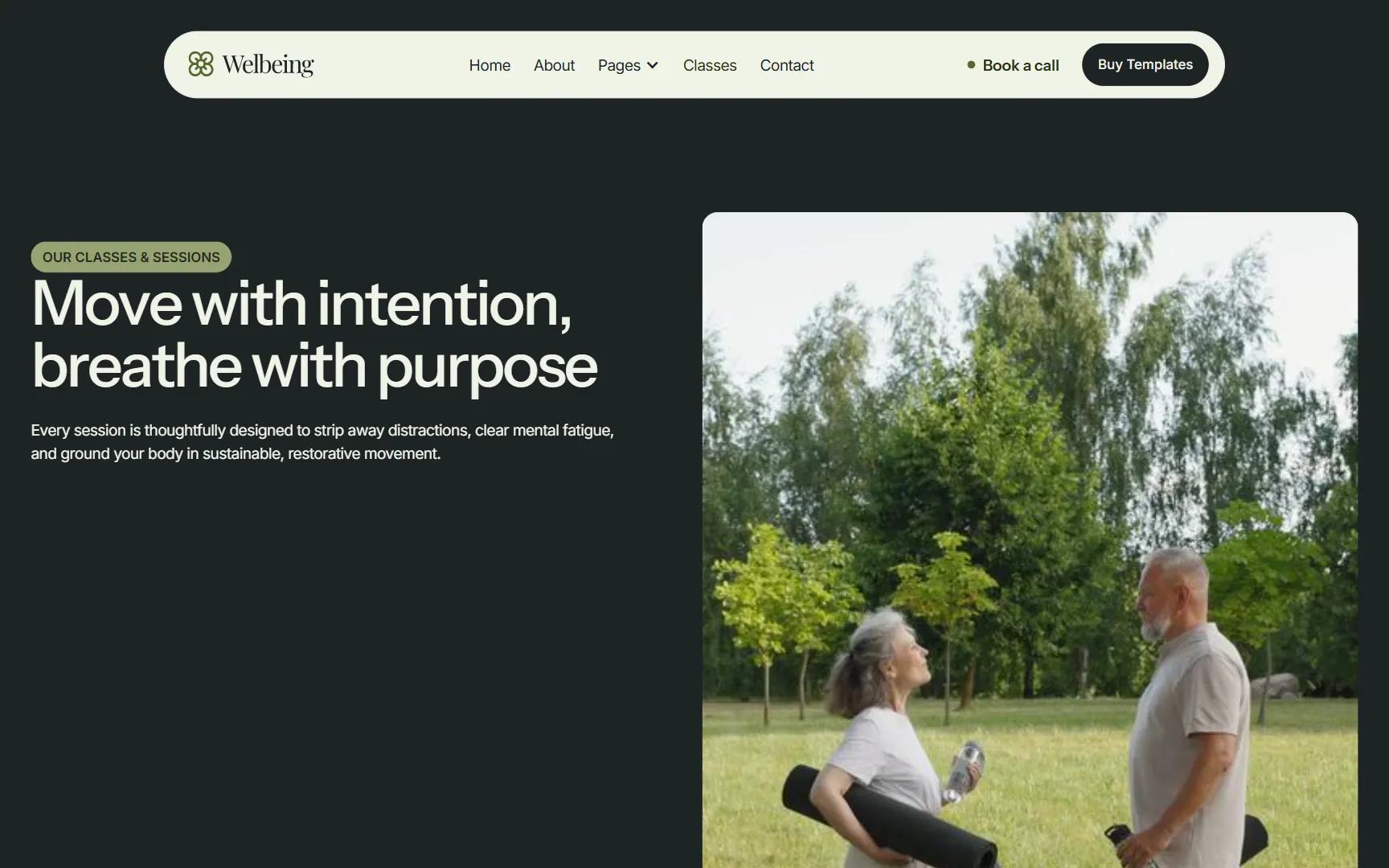
Welbeing: Wellness Website Template for Yoga, Pilates and Meditation Studios
Welbeing is a wellness website template for Webflow, made for studios that sell calm. New students want to know a few things before they book: what classes you run, when they happen, who teaches them and what the space feels like. Welbeing answers each one with class pages, a weekly schedule, instructor profiles, events and retreats, real member stories and simple contact forms, across nine layouts and 26 pages.
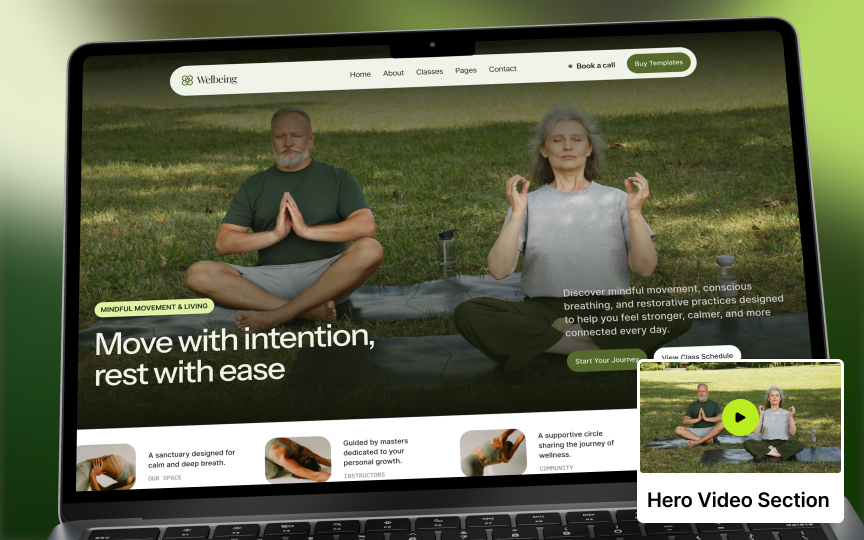
Quick facts
A Calm, Natural Look That Feels Like Your Studio
A wellness website should lower the heart rate, not raise it. Welbeing uses soft colors, generous spacing and real photography of people practicing, so visitors feel the atmosphere of your space before they visit.
Color
An olive green brand color (#55682C) with a lighter sage (#96A854) and a pale lime accent (#E0F2A4) for tags, set on warm off-white (#F3F1EF) and deep charcoal sections (#1A1A17). Change the Webflow variables once and the whole site follows.
Typography
Instrument Sans for headings, Inter for body copy and IBM Plex Mono for small labels such as "MINDFUL PRACTICE" and "UPCOMING EVENTS".
Imagery and motion
Photos and video loops of outdoor meditation, studio flows and props, sourced from Lummi and free for commercial use. Gentle GSAP reveals, counting numbers and a moving philosophy strip add life without feeling busy. Icons come from Phosphor.
Nine Layouts for Every Kind of Studio
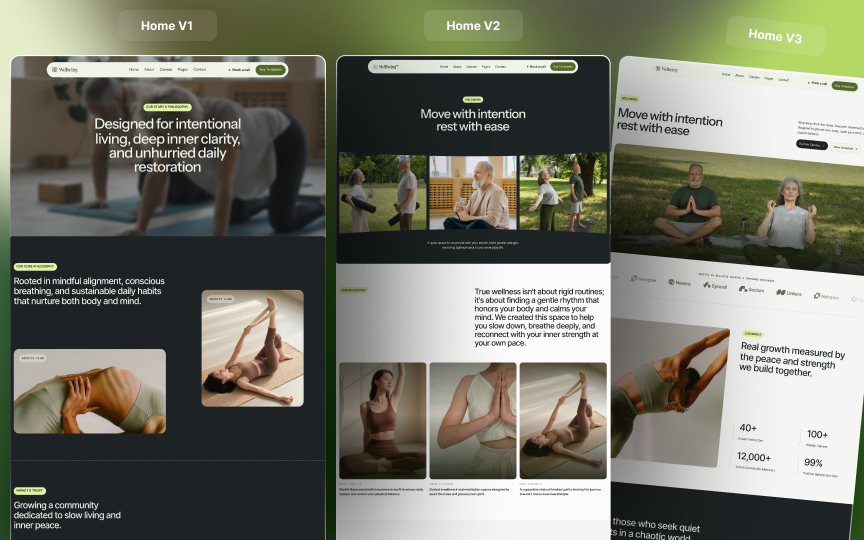
A neighborhood yoga studio, a pilates room and a meditation center each greet visitors differently. Welbeing gives you three layouts each for Home, About and Contact.
All layouts share the same navigation, newsletter signup and footer, so one edit updates every page.
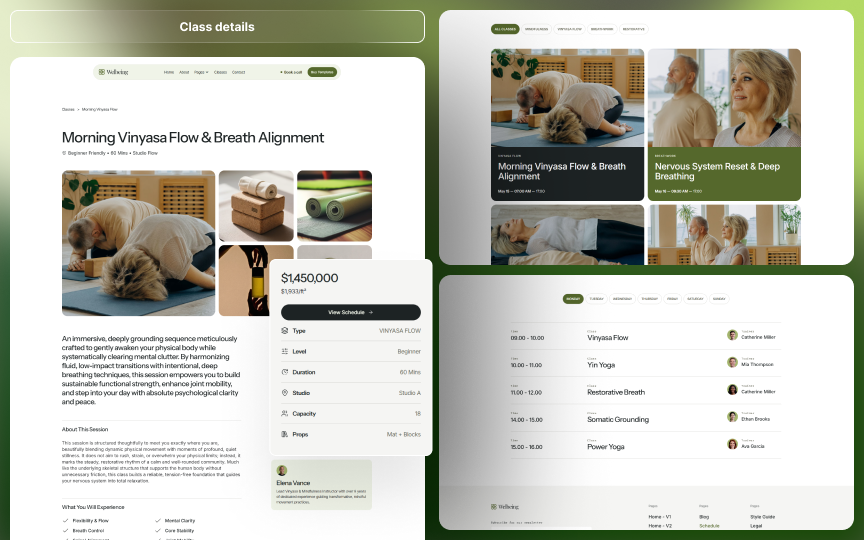
Class Pages and a Weekly Schedule Students Can Plan Around
The first question a new student asks is "what can I join, and when?" This yoga website template answers it twice: a filterable Classes page for browsing and a Schedule page for planning the week.
Classes page
Class cards show the style, name, date and time. Filter buttons (All classes, Mindfulness, Vinyasa Flow, Breathwork, Restorative) help visitors find the right session fast.
Class detail page
Every class in the Classes CMS collection gets its own page with:
Weekly schedule
The Schedule page has a tab for each day of the week. Each slot lists the time, class name and teacher with a small photo, so students can plan their week at a glance.
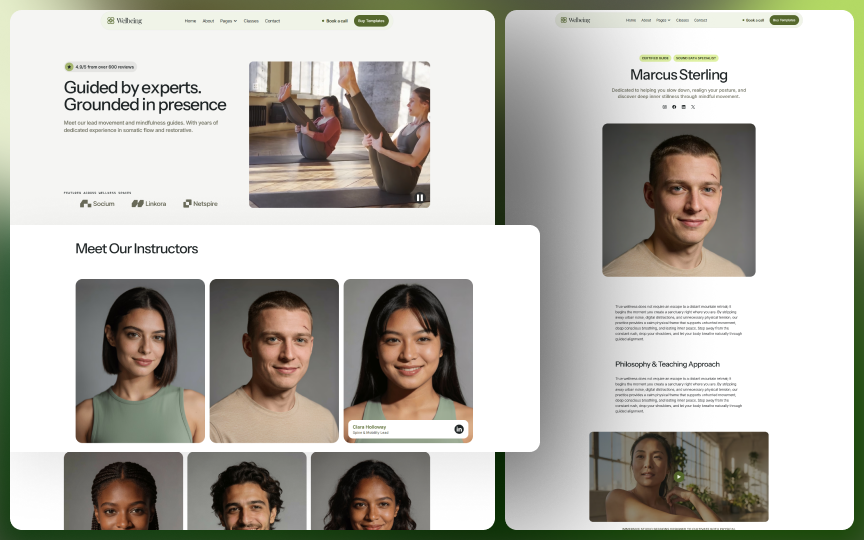
Instructor Profiles That Build Trust Before the First Class
People choose a studio because of the teachers. The Instructors page shows each guide with a portrait, name and specialty, and every instructor gets a full profile page from the Instructors CMS collection.
Six sample instructors are ready to edit, from a lead vinyasa teacher to a sound bath specialist and a breathwork facilitator.
Promote Workshops, Sound Baths and Retreats
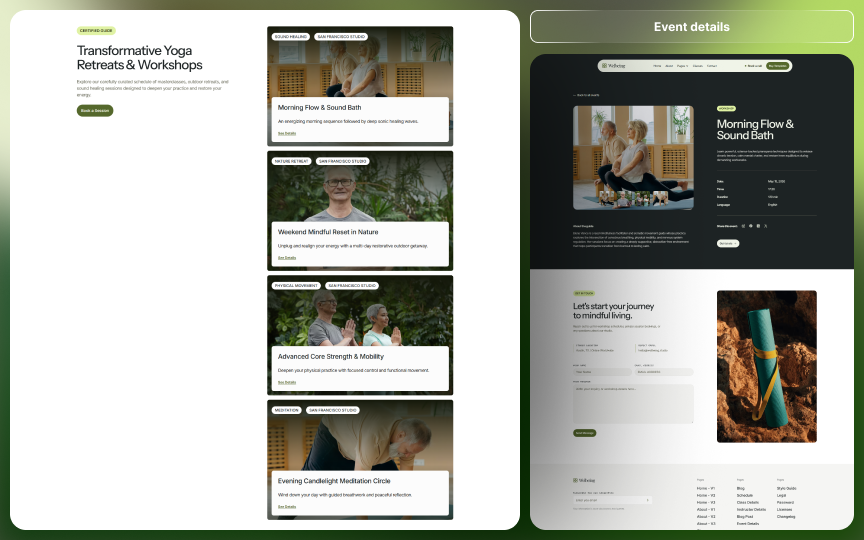
Workshops and retreats are often a studio's highest-value offers. Welbeing gives them their own Events page and detail pages, so it also works as a retreat website template for studios that run getaways.
- Events page: cards with a category tag (Sound Healing, Nature Retreat, Physical Movement, Meditation), location, short description and a See Details link
- Event detail page: date, time, duration, language, a section about the guide, share links, a Get tickets button and an inquiry form
- Homepage events: upcoming events appear on Home V1, V2 and V3 with booking cards for classes, private sessions and studio questions
Point the Get tickets button to Eventbrite, Momence or your own checkout.
Forms, Booking Links and Social Proof Built In
A studio site has one job: turn a curious visitor into a booked student. Welbeing ships the pieces that do that, all native Webflow.
Forms
Submissions land in Webflow's form inbox. Send them to Mailchimp, a CRM or Google Sheets through Zapier, Make or a webhook.
Booking
Welbeing does not include its own booking system, because most studios already use one. Link the Book a call, View Class Schedule and Get tickets buttons to Mindbody, Momence, Acuity or Calendly, or place their booking widget on a page with Webflow's Embed element.
Social proof and content
- Testimonials page with 11 member stories, each with a name and city
- Impact counters for instructors, weekly classes, members and satisfaction
- FAQ accordions on homepages
- Studio tour and practice videos to show the space
- Journal for articles on breathwork, movement and rest
Not included
Welbeing is a marketing site. It doesn't include online class booking, memberships, payments or a student login. Use your booking tool for those and link to it from the site.
A Yoga Studio Website Template With Every Core Section
Good wellness sites share the same building blocks. Here is where each one lives in Welbeing.
26 Pages Ready to Customize
The Blog page has category filters (Mindfulness, Breathwork, Movement, Restoration), and each Blog Post page has a long-form layout with a More from Our Journal block.
Add Classes, Teachers and Events Without Touching the Design
Welbeing runs on four Webflow CMS collections. Add an item and it appears on every list that uses it.
Your team can update the schedule, add a new teacher or post a retreat in the Webflow Editor without breaking layouts.
Plan note: CMS collections need a Webflow CMS site plan (or higher) to publish on a custom domain.
Easy to Browse on a Phone Before Class
Most students check class times on their phone, often on the way to the studio. Welbeing is built for desktop, tablet and mobile breakpoints.
- The navigation collapses into a clean mobile menu
- Class filter buttons wrap into tidy rows and class cards stack into one column
- The weekly schedule is split into day tabs, so students see one day at a time
- Contact forms use full-width fields that are easy to fill in
[IMAGE: welbeing-mobile-responsive-views.png | Alt: Welbeing wellness template on mobile showing hero, classes and contact form]
Who Welbeing Is Built For
- Yoga studios that run daily classes and need a clear schedule
- Pilates studios that want class pages with level, length and equipment
- Meditation centers that host circles, sound baths and silent retreats
- Wellness studios that combine movement, breathwork and rest
- Independent teachers looking for a yoga teacher or yoga instructor website template that can grow into a studio site
- Health and wellness coaches who offer private sessions and workshops
- Webflow designers who build sites for wellness clients
Why Studios Choose Welbeing
Make It Your Own
- Brand: change the olive, sage and lime colors and the fonts once in Webflow variables, and they update site-wide
- Layouts: mix Home, About and Contact variations or remove the ones you don't need
- Classes: rename the class styles and filter buttons to match your timetable
- Schedule: edit time slots, class names and teachers for each day
- Counters: change the numbers through the data-count attribute, as explained on the Instructions page
- Booking: point every booking button to your own booking tool
Want a team to handle the wellness website design changes for you? Flownix offers Webflow template customization to adapt Welbeing to your studio, photos and booking setup.
Secure, Reliable Webflow Hosting
Welbeing runs on Webflow, so your studio site gets Webflow's managed hosting and security features:
- Free SSL certificates on published sites
- Global CDN delivery through Webflow hosting
- Automatic backups and version history you can restore
- Two-factor authentication and roles for your Workspace
- No plugins to patch or servers to maintain
Learn more on Webflow Security, Webflow Hosting and the Webflow Trust Center.
Forms note: keep the contact forms for general questions. Don't ask for injuries, medical conditions or other health details in Webflow forms; collect intake and waiver information in your booking tool or a dedicated health form service. Add a consent checkbox and link your Privacy Policy before launch.
Welbeing vs Other Ways to Build a Studio Site
What's Included With Welbeing
Webflow requirements
- A Webflow account to open and edit the template
- A CMS site plan (or higher) to publish the Classes, Instructors, Events and Blog collections on a custom domain
- Templates start as a new project, so they can't be applied to an existing Webflow site
- Code export needs a paid Workspace plan (Core or higher)
Launch Your Studio Website With Welbeing
Class pages, a weekly schedule, instructor profiles and events that turn visitors into students. Get Welbeing for $129 and give your studio a website that feels as calm as your classes.
Pages Included
- Home V1
- Home V2
- Home V3
- About V1
- About V2
- About V3
- Classes
- Schedule
- Events
- Event Single (CMS)
- Instructors
- Testimonials
- Blogs
- Blog Single (CMS)
- Contact V1
- Contact V2
- Contact V3
Single Use License
Can only be used by you or one client for one end product. You cannot resell or redistribute this template in its original or modified state.
Flownix supports this template
Questions about this template? Just reach out to the template designer and they will get back to you within 2 business days.
For advanced design guidance, please share your questions in the Webflow Forum or reach out to a Webflow Partner.
What platform is Welbeing built on?
Welbeing is a Webflow template. You edit it in the Webflow Designer and Editor, with no code or plugins needed.
Who is this wellness website template for?
Yoga, pilates and meditation studios, wellness studios, independent teachers and wellness coaches.
How many pages does Welbeing include?
26 pages: three Home, three About and three Contact layouts, Classes, Schedule, Instructors, Events, Blog, Testimonials, four CMS templates and seven utility pages.
Can students book classes on the site?
Welbeing doesn't include its own booking system. Link the booking buttons to Mindbody, Momence, Acuity or Calendly, or embed their booking widget.
How do I update the weekly schedule?
Open the Schedule page in Webflow and edit the time, class and teacher for each day.
Can I add more classes, instructors and events?
Yes. They are CMS collections, so each new item gets its own page and appears in every list automatically.
Can I use it for a pilates or meditation studio?
Yes. Rename the class styles and filter buttons, and the layouts work for any calm, class-based studio.
Do I need a paid Webflow plan?
You can edit for free. To publish the CMS collections on a custom domain you need a CMS site plan or higher.
Where do form submissions go?
To Webflow's form inbox and email notifications. You can send them to Mailchimp or a CRM through Zapier, Make or a webhook.
Is the Figma file included?
Yes. The Figma file is free with your purchase.
Welbeing - Health & Wellness Website Template
Welbeing is a calm, modern wellness website template built in Webflow for yoga studios, meditation centers, and wellness studios. Launch with 3 homepage variations, CMS-powered classes, and a design system you can restyle without code.
Why Flownix
You can pick a launch-ready template and go live right away, get it customized in 1-3 days, or let us build a complete Webflow website from scratch. Whatever your business needs, Flownix makes building on Webflow simple and efficient.




Frequently Asked Questions
Yes, of course. You can purchase an individual template to build one website.
If you need more than one website, you'll have to purchase every template separately. That’s because every template comes with its own license to use.
In that case, you can choose one of our bundles that suits you best. With our bundles, you can use several templates to build as many websites as you need with one license.
Yes, we do. If you buy our Yearly Webflow Template Bundle, you get every new template we release for one full year.
If you buy the Lifetime Webflow Template Bundle, you get every new template we release forever (along with all their updates).
Either way, we never push updates into a site you’ve already built, so your live site stays exactly the way you left it.
Absolutely. You can edit the layouts, colors, fonts, images, and other elements directly in the Webflow Designer. We use organized classes, Webflow variables, and CMS collections to make the process easier for you.
If you would rather have us do it, our Webflow Template Customization Service starts at $149.
Yes, you can. Since every template is also sold on its own, you’ll be fine with it as long as you need just one website.
If you think you’ll need more than one sooner or later, our bundles are the better deal.
You get access to our whole Webflow template collection for about what two or three single templates would cost. That means it saves you a lot in the long run.
It’s simple - you can either click “Buy Now” on any template or open the template’s “Details" page and click the “Purchase” button. Either way, you’ll go straight to the “Checkout” page. You can then complete your payment there and get instant access to your template.
A free Webflow account is enough to open and edit a template. If you want to publish your website on your own domain, you’ll need a paid Site Plan. If your preferred template has CMS features like blogs or project listings, make sure you choose a plan that supports the CMS features you need.
Yes, definitely. Our webflow HTML website templates are designed for desktop, tablet, and mobile screens. You can check how each one looks on different devices using the Live Preview feature. We recommend that you open the preview on your phone too so you can see how it feels to browse.
Yes, you can. If you own both templates, you can copy sections from one template and paste them into another. You may need to adjust some styles or settings to get everything looking right, but it’s a great way to create the best layout for your needs. If you get stuck along the way, we're here to help with the customization too.
No worries. Feel free to send us the template link and let us know what you’d like to add. We can design and build a new section that matches the rest of your website through ourWebflow Template Customization Service.
Success Stories
Here's what designers, agencies, and businesses think about their experience with Flownix.

Exactly what I needed
I wanted something clean and simple for my business. This template had pretty much everything I needed, and making changes was easier than I expected.

Launched in two days
I bought a template on Monday and our site was live by Wednesday. Everything was well organized, so I only had to change the text and images.

Really easy to customize
The design looked great already, but I wanted to make it feel more like our brand. Changing colors, fonts, and sections was pretty straightforward.

Would definitely use again
Loved how simple everything was. The design feels modern without being too much, and updating content is easy. Already considering another template for my next project.

Made our launch easier
We were on a pretty tight schedule and needed a website quickly. The template saved us a lot of work, and we managed to launch right on time.




So easy to customize!
The attention to detail in every template is impressive. Smooth animations, clean layouts, and flexible components made the entire customization process simple and enjoyable.
So easy to customize!
The attention to detail in every template is impressive. Smooth animations, clean layouts, and flexible components made the entire customization process simple and enjoyable.
So easy to customize!
The attention to detail in every template is impressive. Smooth animations, clean layouts, and flexible components made the entire customization process simple and enjoyable.
So easy to customize!
The attention to detail in every template is impressive. Smooth animations, clean layouts, and flexible components made the entire customization process simple and enjoyable.
So easy to customize!
The attention to detail in every template is impressive. Smooth animations, clean layouts, and flexible components made the entire customization process simple and enjoyable.





Experience the Power of Ready-to-Launch Webflow Templates with Flownix
You can pick a pre-made Webflow template to launch your website right away, get help with complete customization, or build a website designed specifically for your brand.