Zyrova: AI SaaS Website Template for Webflow
Zyrova is an AI website template for Webflow, built for AI SaaS products, automation platforms, smart assistants and productivity software. It gives you three home layouts, 22 pages, a CMS blog and integrations directory, and a dark interface that looks at home next to the AI tools your buyers already use. Pick a layout, add your product details and launch on Webflow hosting. Every purchase includes the Figma file for free.
Quick facts
A Dark, Focused Design Built for AI Products
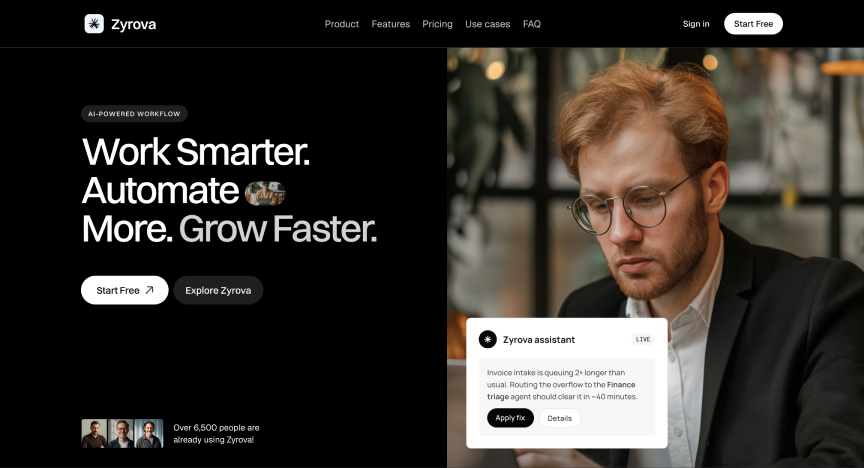
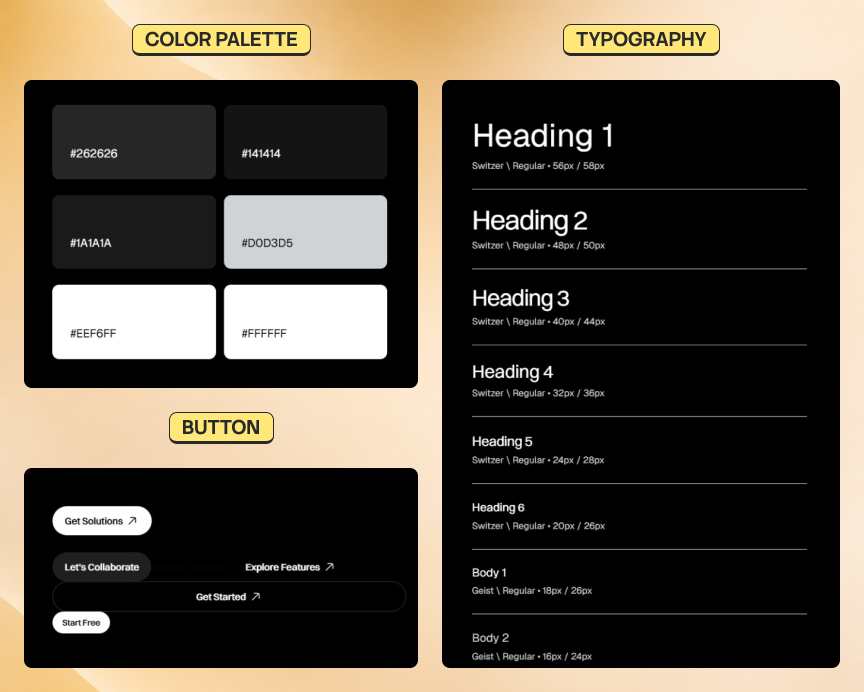
AI buyers judge a product by how calm and capable its website feels. Zyrova uses a near-black interface, soft gray surfaces and a single green accent, so your product screenshots and calls to action stand out without visual noise. Every page follows the same rhythm of large headlines, short supporting copy and floating interface cards that show your product at work, like the "Zyrova assistant" card on the Home V1 hero.
Typography that reads like a product
- Switzer for headings: a clean grotesk with a confident, modern feel.
- Geist for body text: designed for interfaces and easy to read at small sizes.
- Geist Mono for labels and small tags, which gives sections a technical, product-like touch.
All three fonts are free for commercial use. Switzer comes from Fontshare under the ITF Free Font License, and Geist and Geist Mono come from Google Fonts under the SIL Open Font License.
A visual system you control
Colors, font sizes, spacing and corner radius are all Webflow Variables. Base Colors hold the raw palette, and semantic Pick Colors (Text, Background, Border, Button) point to that palette. Change the accent once and every button, link and highlight updates across the site.
Motion with purpose
Headings reveal letter by letter, cards fade up as you scroll, and buttons roll their label on hover while the arrow turns to point forward. Lenis adds smooth scrolling. You can add the same animations to any new element with a custom attribute, without opening the Interactions panel.
Imagery and icons
Images are AI-generated visuals from Lummi, free for personal and commercial use under the Lummi License. Icons come from Hugeicons Free under the MIT License.
Three Homepage Layouts for Your AI SaaS Landing Page
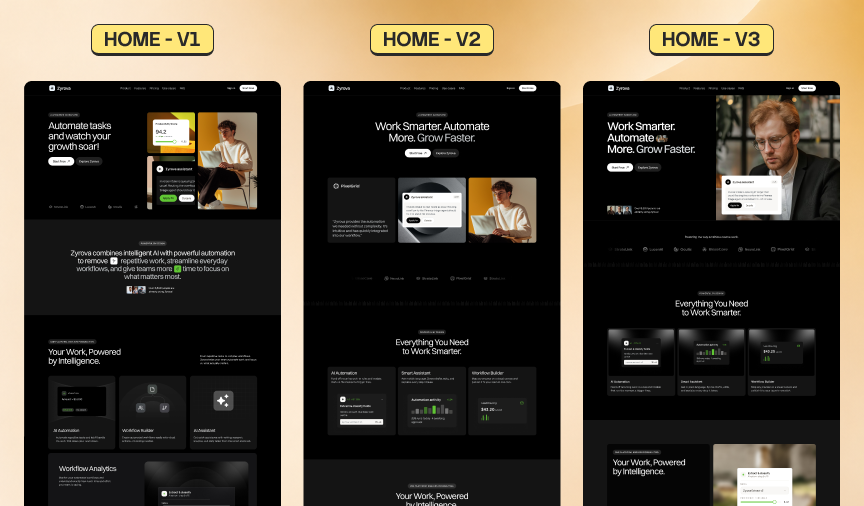
Every AI product launches differently. Some lead with a bold promise, some with a product demo, some with proof. Zyrova gives you three complete homepages, so you can pick the one that fits your launch, set it as the homepage in the Pages panel and delete the others.
All three share the same navbar, footer, buttons and Variables, so switching layouts never breaks your brand styling.
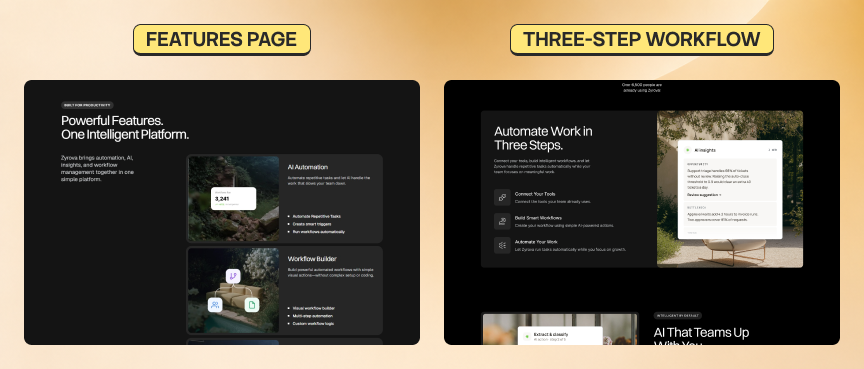
Sections Built to Sell an AI Product
An automation website template only works if its sections answer the questions AI buyers actually ask: what does it do, how hard is it to set up, does it work with my tools, and what does it cost. Zyrova has a ready-made section for each.
The copy in each section is written for an AI workflow product, so you edit names and numbers instead of writing from a blank page.
An Integrations Directory and Working Site Features
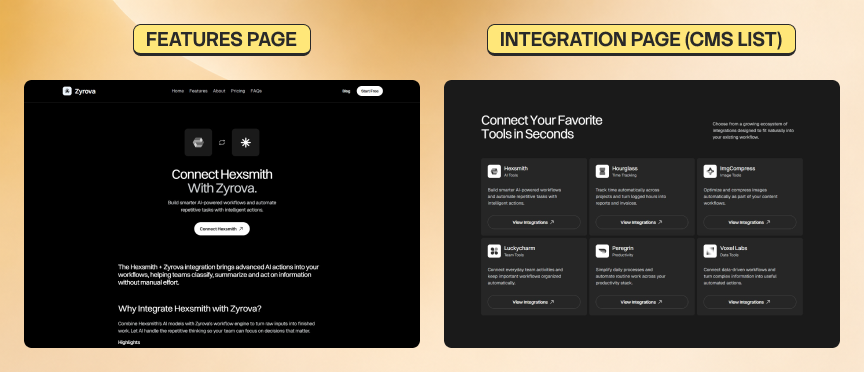
A ready-made integrations directory
AI buyers want to know your product fits the tools they already use. Zyrova includes a complete integrations directory powered by the Webflow CMS, with six sample listings (AI Tools, Time Tracking, Image Tools, Team Tools, Productivity, Data Tools). Swap in your own tools, logos and links to show buyers what your product connects with.
- Integrations page: a card grid with logo, name, category, short description and a link to each integration.
- Integration detail template: one page per integration, generated from the CMS, with a hero, "Why integrate" copy, highlights, a step-by-step workflow, automation examples and related integrations.
- Features page stack grid: shows the first six integrations automatically.
Add a new integration in the CMS and the directory, the detail page and the Features grid all update. The integrations section is a marketing page for your product's own connections; it does not create API connections by itself.
Functionality that works on publish
- Contact forms on three contact layouts with First Name, Last Name, Work Email, Company and Message fields. Submissions go to Webflow form handling, and you can route them to email or a connected tool.
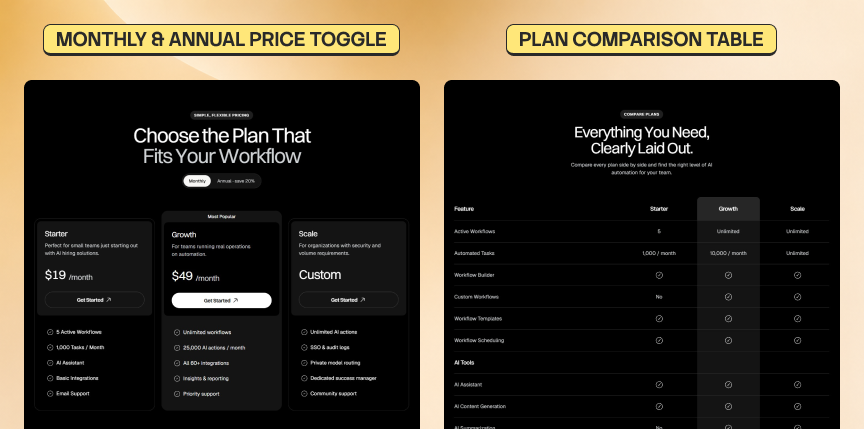
- Monthly and annual pricing switch with a "save 20%" label, plus a feature comparison table.
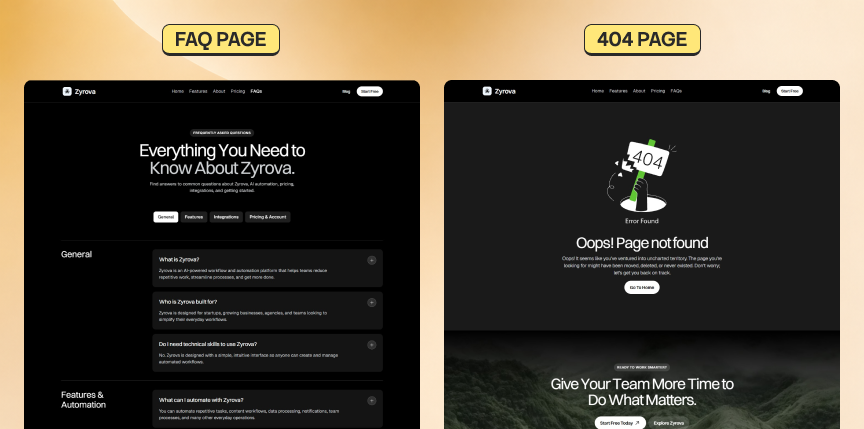
- FAQ page grouped into General, Features & Automation, Integrations, and Pricing & Account, with an accordion on each question.
- Smart navbar with a Pages dropdown that hides on scroll down and returns on scroll up, plus a native Webflow mobile menu below 992px.
- Reusable components: navbar, footer and six button styles. Button text and links are component properties, so you edit them per instance.
- Password and 404 pages styled to match the site.
What This AI Website Template Is (and Isn't)
"AI website template" can mean two different things, so here is the short version.
Every Page in the Zyrova Template
Zyrova has 22 pages: 14 static pages, 2 CMS template pages and 6 utility pages.
Static pages (14)
CMS template pages (2)
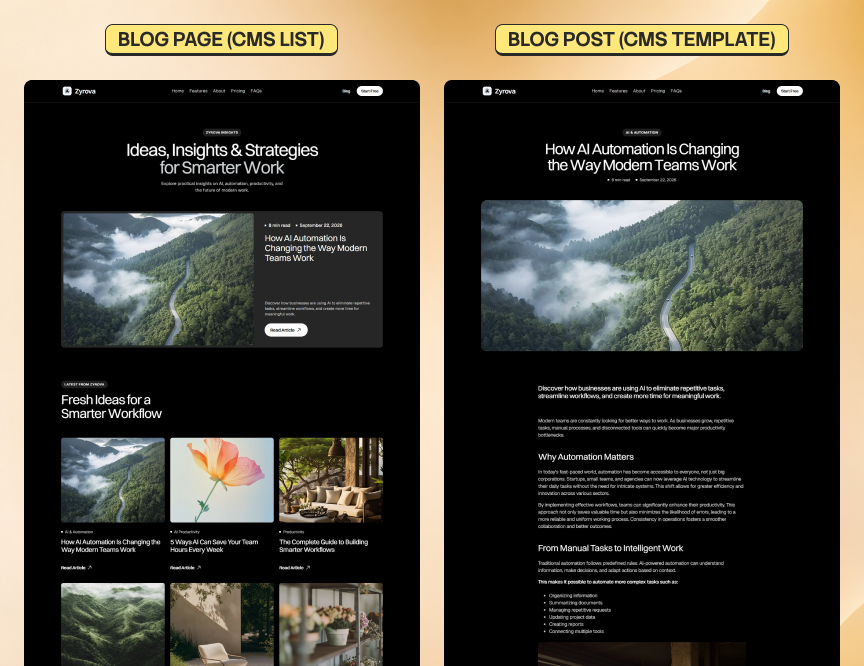
- Blog post (/blog/...): article layout with related posts and a call to action.
- Integration detail (/integration/...): one page per integration with highlights, workflow steps and automation examples.
Utility pages (6)
Style Guide, Licenses, Changelog, Instructions, 404 and Password. Utility pages carry a noindex tag, so search engines skip them. The Instructions page is a written guide to customizing pages, Variables, components, CMS, interactions, GSAP and Lenis, forms, images and icons.
CMS-Powered Blog and Integrations You Can Update Without Code
Zyrova uses two Webflow CMS collections. Add, edit or delete an item in the CMS panel, publish, and every list and template page that uses it updates on its own.
Blog Posts collection
- Fields: name, summary, thumbnail, category, read time, published date, Featured switch, item link and a rich-text body.
- Where it shows: the Blog page, the blog teaser on every homepage and About V3, the related posts on each article, and the blog post template.
- Featured switch: turn it on to place a post in the large card at the top of the Blog page.
- Included: six sample posts on AI automation and workflows, ready to replace with your own articles.
Integrations collection
- Fields: name, logo, category, description and item link.
- Where it shows: the Integrations page, the integration detail template and the first six cards on the Features page.
Publishing tips from the Instructions page
- Upload images at twice their display size and convert them to WebP in the Assets panel.
- Fill in alt text for every image.
- Change how many items a list shows in the Collection List's Limit items setting.
Plan note: publishing CMS collections on a custom domain needs a Webflow CMS site plan or higher. Check Webflow's current plan limits for how many CMS items you can add.
Responsive on Desktop, Tablet and Mobile
Many AI buyers first see your site on a phone, from a social post or a product directory. Zyrova is built on Webflow's standard breakpoints, and its layouts restack cleanly at each one.
Responsive by design, not by patching
The font size, line height, spacing and radius Variables each have Tablet, Mobile (L) and Mobile modes that switch automatically at each breakpoint. That means type and spacing scale together across the whole site, and you rarely need to fix a single element by hand. Check your own content on every breakpoint before you publish, especially long headlines and new images.
Who Zyrova Is For
AI SaaS and automation platforms
Workflow builders, no-code automation tools and AI operations software. The three-step workflow, integrations directory and pricing comparison already match how these products sell.
AI startups preparing a launch
An AI startup website template that gets you from idea to a credible site quickly, with a homepage, pricing, blog and contact pages ready for launch day.
AI agents, assistants and chatbots
The assistant cards in each hero and the AI capability sections suit an AI agent or AI chatbot website, where showing the assistant at work matters more than long feature lists.
Productivity and team tools
Task management, time tracking and analytics products can use the Features page, Smart Insights blocks and use-case tabs for marketing, sales, operations and support teams.
AI agencies and studios
An AI agency website template for teams that build automations for clients. Repurpose the integrations directory as a list of tools you work with and the pricing page as service packages.
Not the right fit if
You need an ecommerce store, a multi-language site out of the box, or a logged-in product dashboard. Zyrova is a marketing website.
Why Teams Choose Zyrova
- Launch sooner. The pages an AI SaaS site needs are already designed and connected, so your time goes into your product story, not layout work.
- Look established from day one. A consistent dark design system helps a new AI product look as polished as larger competitors.
- Sell the product, not just describe it. Assistant cards, workflow steps and integration pages show buyers how your tool works.
- Grow content without a developer. The CMS blog and integrations directory let marketers publish new posts and integration pages on their own.
- Rebrand in minutes, not days. Variables and components carry colors, type and buttons across all 22 pages.
- Own it outright. One payment, no subscription to Flownix.
Results depend on your product, content and marketing; a template gives you a strong starting point, not guaranteed traffic or sales.
How to Customize Zyrova in Webflow
- Pick your layouts. Keep the home, about and contact versions you like, delete the rest, and set your homepage in the Pages panel.
- Set your brand. Edit the Base Colors Variables for your palette. Semantic tokens such as Text/Accent and Button/Primary BG Hover follow automatically.
- Change fonts. Add your font in Site settings > Fonts, then select it in the Font Family/Heading, Font Family/Body or Font Family/Mono Variable.
- Edit shared parts once. Double-click the navbar, footer or a button to edit the component; changes appear on every page.
- Replace the content. Update product names, pricing, testimonials and CMS items with your own.
- Animate new elements. Add a custom attribute such as Reveal-anim-1 or section-title to any element to reuse the built-in animations.
- Finish SEO settings. Update the SEO title, meta description and Open Graph image of every page before launch.
Learning curve: if you have used the Webflow Designer before, most edits take minutes. If you are new to Webflow, start with the Instructions page inside the template and Webflow University. Prefer to hand it off? Flownix offers Webflow template customization.
Performance: Tested Lighthouse Scores
We ran Google Lighthouse 12 on the Zyrova live preview homepage (Home V1) on 19 November 2026. Scores change between runs and depend on your content, so treat these as a baseline.
*The SEO score is lower on the preview because webflow.io staging pages are set to noindex. On your own published domain, that check passes.
What drives the score, and how to improve it
The page is light (under 1.1 MB), so weight is not the problem. The main cost is animation work on the phone's processor.
- Letter-by-letter heading animations. GSAP script work took about 4.6 seconds of main-thread time on the mobile test. Use the section-title attribute on fewer headings, or turn it off on mobile.
- Hero image fades in after a delay. The largest element on screen is the hero image, which waits for the load animation. Removing the delay on the hero image helps Largest Contentful Paint the most.
- Load only the font weights you use. Geist loads nine weights (100 to 900). Keeping two or three cuts about half of the font download.
- Zero layout shift. Cumulative Layout Shift is 0 on both devices, so the page does not jump while it loads.
- Accessibility scored 93. The remaining items (4 color contrast and 3 ARIA warnings) are scheduled for the next template update.
Hosted on Webflow's Secure Infrastructure
When you publish Zyrova on Webflow hosting, your site runs on the same infrastructure as every Webflow site:
- Free SSL/TLS certificates on every published site, with HSTS support.
- Global CDN so pages load from a server close to your visitors.
- DDoS protection at the hosting layer.
- No plugins to patch. Webflow sites have no theme or plugin updates, which removes a common source of vulnerabilities.
- Compliance: Webflow publishes its SOC 2 report and security practices on its Trust Center.
Learn more on Webflow Security, Webflow Hosting and the Webflow Trust Center.
Your AI product's own app, data and APIs are separate from the marketing site and need their own security setup.
Zyrova vs a Custom Build vs a Free Template
A custom build makes sense when you need a fully unique brand experience and have the budget. For most AI startups that want to launch fast and spend on the product, a premium template is the practical middle ground.
What You Get With Zyrova
- A Webflow project with all 22 pages: 3 homepages, 3 about pages, 3 contact pages, Features, Pricing, Integrations, Blog, FAQs, 2 CMS templates and 6 utility pages
- Blog Posts collection with 6 sample articles and an Integrations collection with 6 sample listings
- Webflow Variables for colors, typography, spacing and radius, with responsive modes
- Navbar, footer and six button components
- Attribute-based GSAP animations and Lenis smooth scrolling
- Style Guide, Licenses, Changelog and Instructions pages
- Commercial-use fonts (Switzer, Geist, Geist Mono), Lummi images and Hugeicons Free icons
- The full Figma design file, free with every purchase
- Instant delivery: after checkout you receive a link, and one click adds Zyrova to your Webflow Workspace
License
Zyrova is sold under a Single Use license : use it for one website, for yourself or for one client. You can customize it as much as you like. You can't resell or redistribute the template, as is or modified. For multiple sites, buy one license per site.
Webflow plan requirements
- Templates are added as a new Webflow project; they can't be applied to an existing project.
- Publishing to a custom domain needs a Webflow site plan, and the CMS collections need a CMS site plan or higher.
- Exporting code needs a paid Workspace plan (Core or higher).
- Zyrova's forms use standard fields only, so there is no file-upload plan requirement.
Support From the Team That Built It
Flownix designs and develops every template in-house, so questions go to the people who built Zyrova.
- Template questions: we reply within 2 business days.
- One-on-one help: free for every Zyrova buyer.
- Done-for-you changes: need a new section, page or full rebrand? See Webflow template customization.
- Self-serve: the Instructions page inside the template covers Variables, components, CMS, animations, forms and images.
Support covers the template as delivered. Changes you make, third-party code and your Webflow plan are outside template support.
Launch Your AI Product Website With Zyrova
Three homepages, 22 pages, a CMS blog and integrations directory, and a dark design system built for AI SaaS. Explore every page in the live preview, then make it yours.
Pages Included
Home V1-
Home V2 Home V3About Us V1About Us V2About Us V3Contact V1Contact V2Contact V3Our ServicesServices Details (CMS)Case StudiesCase Studies Details (CMS)Our BlogOur Blog Details (CMS)Pricing PlanCareer Details (CMS)FAQ404401 (Password Protected)Privacy PolicyLicensesStyle GuideChangelogInstructions
Single Use License
Can only be used by you or one client for one end product. You cannot resell or redistribute this template in its original or modified state.
Flownix supports this template
Questions about this template? Just reach out to the template designer and they will get back to you within 2 business days.
For advanced design guidance, please share your questions in the Webflow Forum or reach out to a Webflow Partner.
What is an AI website template?
An AI website template is a ready-made website design for companies that build AI products, such as AI SaaS tools, assistants and automation platforms. Zyrova is an AI website template for Webflow: you edit it in the Webflow Designer and publish it on Webflow hosting.
Does Zyrova use AI to build my website?
No. Zyrova is a hand-built Webflow template designed for AI companies. It is not an AI website generator, so you get a consistent design system instead of a layout generated from a prompt.
Do I need coding skills to use Zyrova?
No. You edit text, images, colors and CMS items visually in Webflow. Basic familiarity with the Webflow Designer helps, and the built-in Instructions page walks you through the main tasks.
Which Webflow plan do I need?
You can customize Zyrova on a free Webflow account. To publish on a custom domain you need a site plan, and because Zyrova uses CMS collections, a CMS site plan or higher.
Are the integrations real connections?
The Integrations page is a CMS-powered directory where you list the tools your product connects with. It shows your integrations to buyers; the actual connections live in your product.
Can I use Zyrova for an AI agent or chatbot website?
Yes. The hero assistant cards, AI capability sections and FAQ suit AI agents and chatbots. Rename the capabilities and replace the product visuals with screenshots of your assistant.
Can I change the colors and fonts?
Yes. Colors, fonts, sizes and spacing are Webflow Variables. Change a variable once and the whole site updates.
Is Zyrova mobile-friendly?
Yes. Every page is responsive across Webflow's desktop, tablet and mobile breakpoints, and the type and spacing Variables switch to mobile values automatically.
Can I use Zyrova for a client project?
Yes, for one client site per license under the Single Use license . Buy one license for each additional site.
Is a Figma file included?
Yes. Every Zyrova purchase includes the full Figma design file at no extra cost, so you can plan layout and brand changes before building them in Webflow.
How do I get the template after buying?
Right after checkout you receive a link. Click it and Zyrova is added to your Webflow Workspace automatically, ready to customize.
Is one-on-one support free?
Yes. Zyrova buyers get free one-on-one support from the Flownix team that built the template.
Zyrova - Technology Website Template
Zyrova is a modern AI SaaS Webflow template designed for AI automation platforms, smart assistants, and productivity software. Featuring sleek layouts, engaging product sections, and flexible pages, it helps SaaS businesses launch with confidence.
Why Flownix
You can pick a launch-ready template and go live right away, get it customized in 1-3 days, or let us build a complete Webflow website from scratch. Whatever your business needs, Flownix makes building on Webflow simple and efficient.



Frequently Asked Questions
Yes, of course. You can purchase an individual template to build one website.
If you need more than one website, you'll have to purchase every template separately. That’s because every template comes with its own license to use.
In that case, you can choose one of our bundles that suits you best. With our bundles, you can use several templates to build as many websites as you need with one license.
Yes, we do. If you buy our Yearly Webflow Template Bundle, you get every new template we release for one full year.
If you buy the Lifetime Webflow Template Bundle, you get every new template we release forever (along with all their updates).
Either way, we never push updates into a site you’ve already built, so your live site stays exactly the way you left it.
Absolutely. You can edit the layouts, colors, fonts, images, and other elements directly in the Webflow Designer. We use organized classes, Webflow variables, and CMS collections to make the process easier for you.
If you would rather have us do it, our Webflow Template Customization Service starts at $149.
Yes, you can. Since every template is also sold on its own, you’ll be fine with it as long as you need just one website.
If you think you’ll need more than one sooner or later, our bundles are the better deal.
You get access to our whole Webflow template collection for about what two or three single templates would cost. That means it saves you a lot in the long run.
It’s simple - you can either click “Buy Now” on any template or open the template’s “Details" page and click the “Purchase” button. Either way, you’ll go straight to the “Checkout” page. You can then complete your payment there and get instant access to your template.
A free Webflow account is enough to open and edit a template. If you want to publish your website on your own domain, you’ll need a paid Site Plan. If your preferred template has CMS features like blogs or project listings, make sure you choose a plan that supports the CMS features you need.
Yes, definitely. Our webflow HTML website templates are designed for desktop, tablet, and mobile screens. You can check how each one looks on different devices using the Live Preview feature. We recommend that you open the preview on your phone too so you can see how it feels to browse.
Yes, you can. If you own both templates, you can copy sections from one template and paste them into another. You may need to adjust some styles or settings to get everything looking right, but it’s a great way to create the best layout for your needs. If you get stuck along the way, we're here to help with the customization too.
No worries. Feel free to send us the template link and let us know what you’d like to add. We can design and build a new section that matches the rest of your website through ourWebflow Template Customization Service.
Success Stories
Here's what designers, agencies, and businesses think about their experience with Flownix.

Exactly what I needed
I wanted something clean and simple for my business. This template had pretty much everything I needed, and making changes was easier than I expected.

Launched in two days
I bought a template on Monday and our site was live by Wednesday. Everything was well organized, so I only had to change the text and images.

Really easy to customize
The design looked great already, but I wanted to make it feel more like our brand. Changing colors, fonts, and sections was pretty straightforward.

Would definitely use again
Loved how simple everything was. The design feels modern without being too much, and updating content is easy. Already considering another template for my next project.

Made our launch easier
We were on a pretty tight schedule and needed a website quickly. The template saved us a lot of work, and we managed to launch right on time.




So easy to customize!
The attention to detail in every template is impressive. Smooth animations, clean layouts, and flexible components made the entire customization process simple and enjoyable.
So easy to customize!
The attention to detail in every template is impressive. Smooth animations, clean layouts, and flexible components made the entire customization process simple and enjoyable.
So easy to customize!
The attention to detail in every template is impressive. Smooth animations, clean layouts, and flexible components made the entire customization process simple and enjoyable.
So easy to customize!
The attention to detail in every template is impressive. Smooth animations, clean layouts, and flexible components made the entire customization process simple and enjoyable.
So easy to customize!
The attention to detail in every template is impressive. Smooth animations, clean layouts, and flexible components made the entire customization process simple and enjoyable.
Experience the Power of Ready-to-Launch Webflow Templates with Flownix
You can pick a pre-made Webflow template to launch your website right away, get help with complete customization, or build a website designed specifically for your brand.