Ventraflow: HVAC Website Template for Heating and Cooling Companies
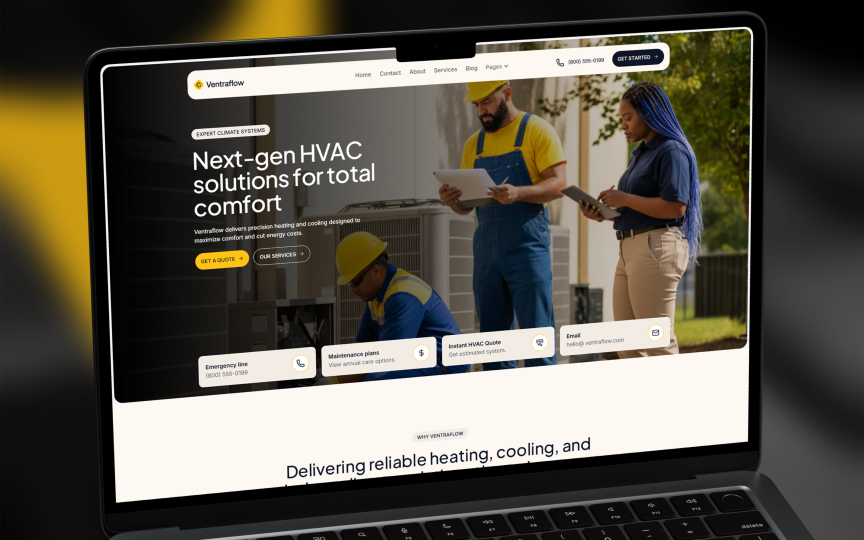
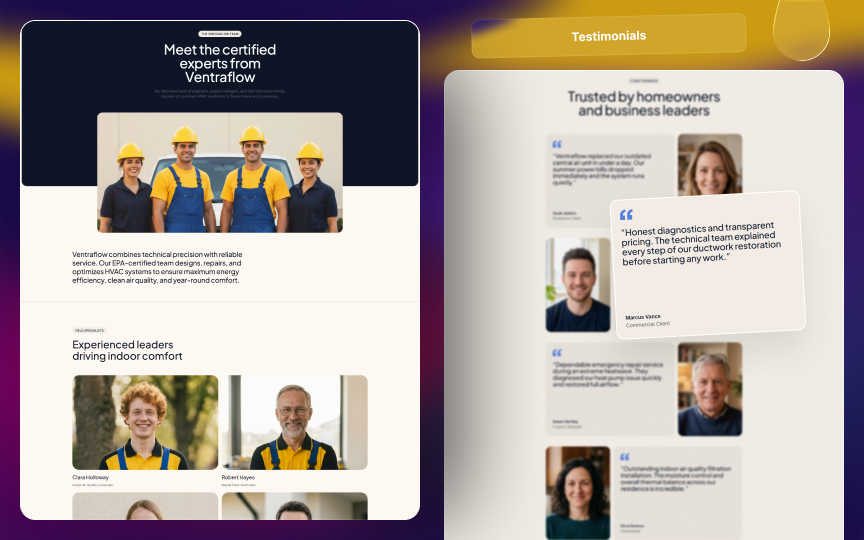
Ventraflow is an HVAC website template for Webflow, built for contractors who repair, install and maintain heating and cooling systems. It puts your emergency line, services, maintenance plans and quote forms where homeowners look first, and backs them with project case studies, reviews and a team directory. Three layouts each for home, about and contact let you present a residential contractor, a commercial HVAC company or a multi-office operator. Every purchase includes the Figma file for free.
HVAC Website Design That Looks Trade-Ready
Homeowners call the contractor who looks dependable. Good HVAC website design makes that judgment easy: clear contact options, real-looking job photos and numbers that prove experience. Ventraflow is built around that idea, with a bold, practical look that reads well on a phone in the middle of a breakdown.
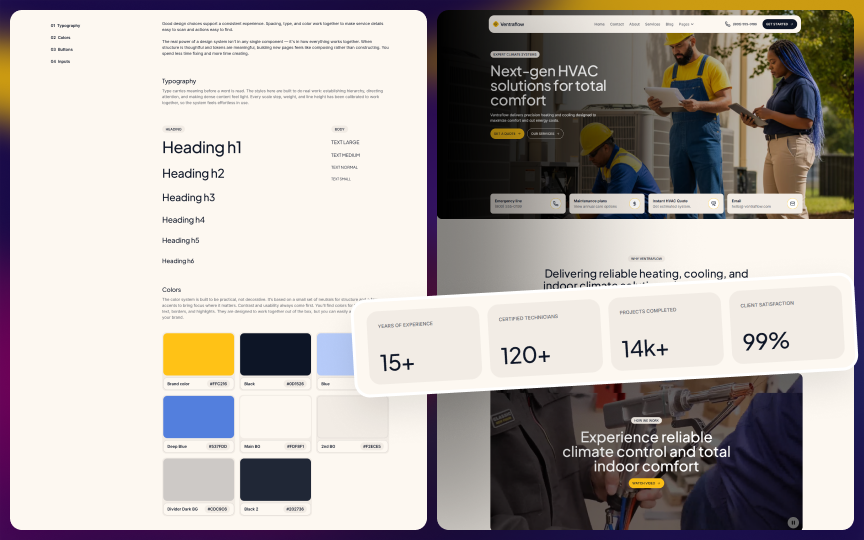
A color palette with a job to do
Deep navy sections carry weight and trust, warm cream keeps long pages easy to read, and signal-yellow highlights the actions that matter: Get a Quote, Choose Plan and the emergency line. The yellow-and-navy pairing also echoes the workwear in the photography, so the brand feels like a real field team.
Typography
- Plus Jakarta Sans for headings: modern, friendly and confident.
- Inter for body text, labels and forms: built for screens and easy to read at small sizes.
Both fonts come from Google Fonts and are free for personal and commercial use.
Proof built into the layout
Impact stats count up as they scroll into view (years of experience, certified technicians, projects completed, client satisfaction). Project pages end with result cards, and service pages carry a rating badge. Change any number by typing it in the Designer; the counter animation reads it automatically.
Motion and media
Cards slide up on scroll, service and pricing cards stack as you scroll, and Lenis adds smooth scrolling on desktop. Background videos from Pexels bring the "How we work" sections to life. Animations run on GSAP and Webflow Interactions, and the Instructions page explains how to adjust or turn them off.
Imagery and icons
Photos are AI-generated images from Lummi, free for commercial use; the people and buildings shown are not real, so replace them with your own crew and job photos for the strongest trust signal. Icons come from Phosphor Icons.
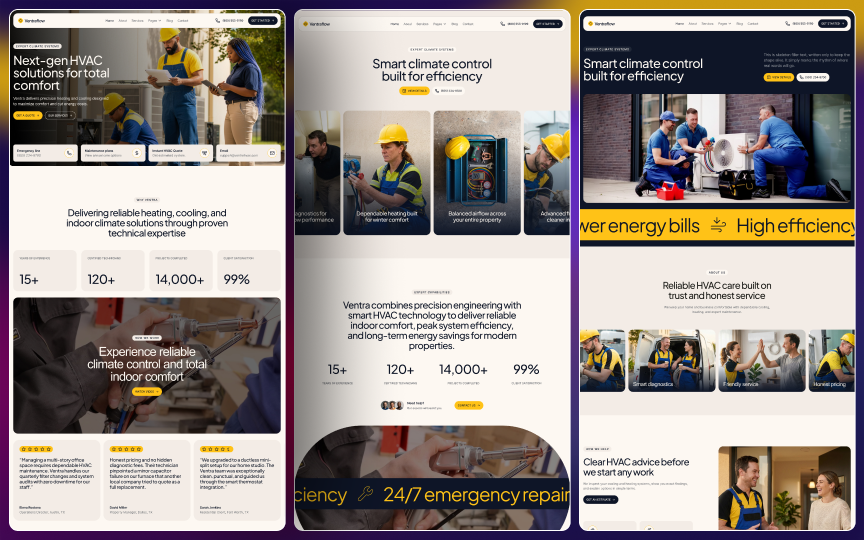
Three Homepage Layouts for Every Kind of HVAC Company
A residential AC repair shop, a commercial HVAC contractor and a multi-office operator sell in different ways. Ventraflow gives you three complete homepages; keep the one that fits and set it as your homepage.
All three share the navbar with a click-to-call number, the footer with a newsletter signup, and the same styles, so switching layouts keeps your branding intact.
Sections Built to Turn Visitors Into Service Calls
People usually look for an HVAC company when something is broken or a season is changing. Each Ventraflow section answers one question they ask before they call.
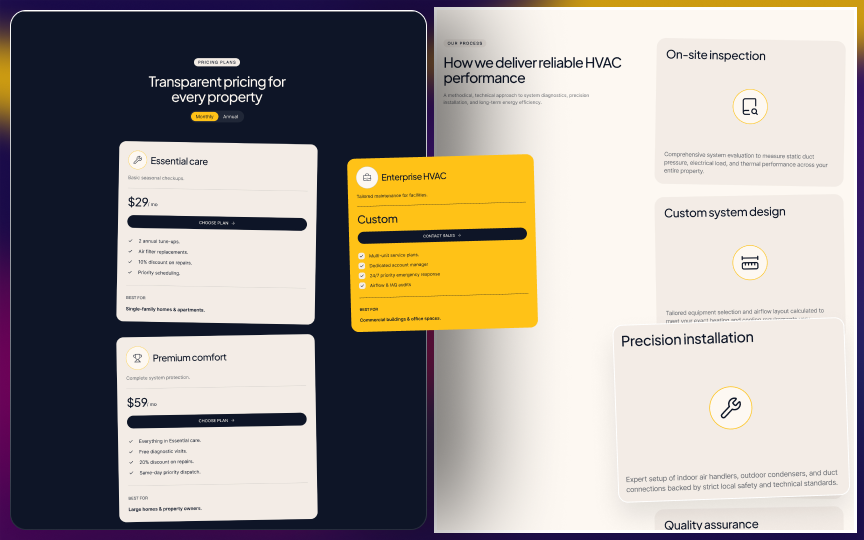
The sample plans show how the section works: Essential care at $29 a month and Premium comfort at $59 a month, with annual prices of $290 and $590 and a custom Enterprise tier. Replace them with your own plans and prices.
Lead Capture and Features That Work on Publish
Quote request forms
- Service quote form on every service page: name, phone, email, a service dropdown and a message.
- Contact 01 form with name, email, phone, service type, message and a "prefer a call" checkbox, so you know how to reach each lead.
- Contact 03 form next to a regional office list with addresses and phone numbers.
- Service dropdown options: AC repair, Heating & furnace, New installation, Maintenance plan, Duct cleaning and Emergency service. Rename them to match your own services.
- Newsletter signup in the footer of every page, with ready success and error messages.
Form submissions use Webflow's built-in form handling. Send them to your inbox, or connect them to your CRM or field service software through Webflow's form integrations or a tool like Zapier.
Built-in interactions
- Click-to-call phone number in the navbar and hero.
- Monthly and annual switch on the maintenance plans.
- "Watch video" button that opens a video lightbox.
- Counters that animate your stats, plus testimonial and project sliders.
- FAQ accordions and a Pages dropdown in the navbar.
- A password page and a custom 404 page that match the site.
What to add yourself
Ventraflow does not include online booking, payments or a service-area map. If you use scheduling software, add its booking widget or a map with a Webflow embed element on any page.
What This HVAC Website Template Is (and Isn't)
Every Page in the Ventraflow Template
Ventraflow has 25 pages: 14 static pages, 4 CMS template pages and 7 utility pages.
Static pages (14)
CMS template pages (4)
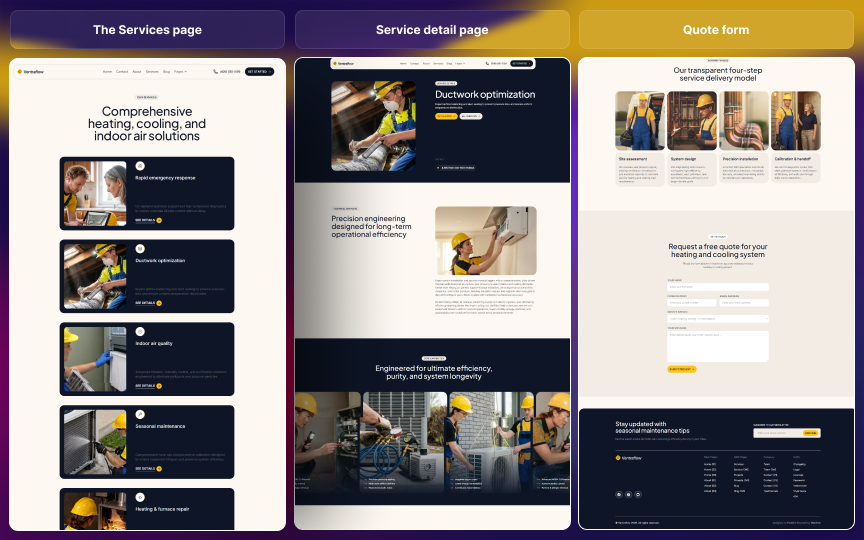
- Service details: overview, core capabilities, a four-step delivery model, a rating badge and a quote form.
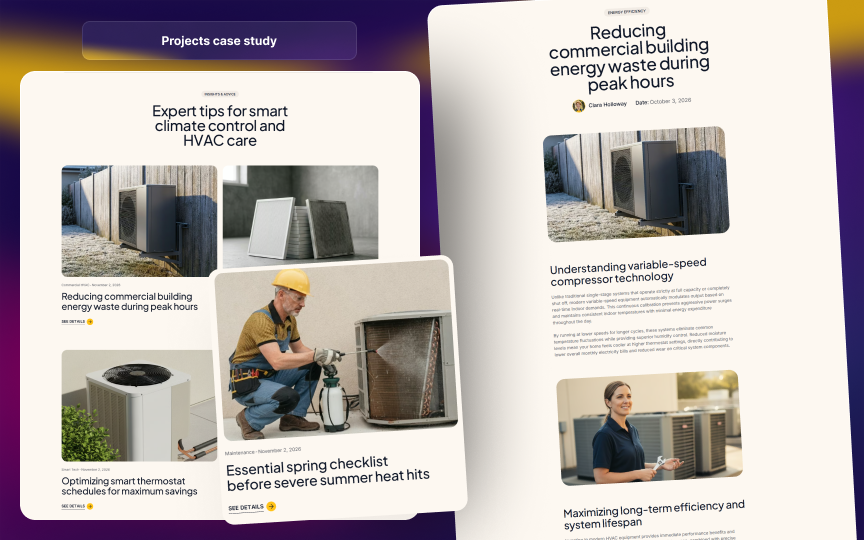
- Project details: location, client challenge, technical work, results write-up and four result stat cards.
- Blog details: article with author, date, category and related posts.
- Team details: role, bio and social links.
Utility pages (7)
Style Guide, Instructions (an animation code guide), Licenses, Changelog, Legal (a privacy policy written for an HVAC business), 401 password page and 404.
Four CMS Collections You Update Without Code
Services, projects, articles and team members are Webflow CMS collections. Add a new service or a finished job in the CMS panel, publish, and every list, slider and detail page that uses it updates on its own.
Tips for your content
- Write a unique description for every service and project; repeated text across pages weakens SEO.
- Use your own job photos and add alt text that names the service and city.
- Keep project result numbers in the stat cards and the write-up the same.
Plan note: publishing CMS collections on a custom domain needs a Webflow CMS site plan or higher. Check Webflow's current limits for how many CMS items you can add.
Built for the Phone in a Homeowner's Hand
When the AC stops on a hot afternoon, people search on their phones. Ventraflow is designed for that moment: the phone number, the quote button and the emergency line stay easy to reach on small screens.
Mobile details that help you get calls
- Tap-to-call phone number in the hero of Home 03 and in the quick-action cards on Home 01.
- Full-width Get a Quote buttons and form fields sized for thumbs.
- Smooth scrolling (Lenis) runs on desktop only, so phones keep their native scroll feel.
Check long service names and your own photos at every breakpoint before you publish.
Who Ventraflow Is For
HVAC contractors and HVAC companies
An HVAC company website template with every page a growing contractor needs: services, maintenance plans, projects, team and reviews.
AC repair and air conditioning installers
An air conditioning website template with an emergency line up front and a quote form that asks which service the visitor needs.
Furnace, heating and heat pump specialists
Service pages for heating and furnace repair and cooling system setup, plus project case studies for heat pump upgrades.
Duct cleaning and indoor air quality companies
Dedicated sections for ductwork optimization and indoor air quality, with result stats like airflow efficiency.
Commercial HVAC providers
The Enterprise HVAC plan, rooftop and commercial project examples, and Home 03's commercial tone suit facility and property managers.
Multi-location and emergency HVAC teams
Contact 03 lists regional offices, and Contact 02 leads with a 24/7 emergency line.
Agencies building HVAC websites for clients
A starting point for HVAC web design projects: customize per client, one license per site.
Not the right fit if
You need online payments, a customer portal or built-in scheduling. Add those through your field service software.
Why HVAC Businesses Choose Ventraflow
- Get found for each service. A page per service and per project gives Google more relevant pages to show for local searches.
- Make it easy to call. The emergency line, click-to-call number and quote buttons sit where mobile visitors look first.
- Sell maintenance, not just repairs. The plans section with a monthly and annual toggle helps you build recurring revenue.
- Prove the work. Project case studies with results and a testimonials page answer "can they handle my job?"
- Update it yourself. Add services, jobs, posts and team members in the CMS without a developer.
- Own it outright. One payment, a free Figma file and free one-on-one support from Flownix.
Calls and rankings depend on your content, reviews and local SEO; Ventraflow gives you a strong, fast-to-launch foundation, not guaranteed results.
How to Customize Ventraflow in Webflow
- Pick your layouts. Keep the home, about and contact versions that fit your business, delete the rest, and set your homepage in the Pages panel.
- Set your brand colors and type. Colors, font sizes and line heights are Webflow Variables. Change the primary color once and every button, badge and highlight updates.
- Add your business details. Replace the phone number, email, office addresses and hours in the navbar, footer, hero cards and contact pages.
- Load your services and jobs. Edit the Services, Projects, Team and Blog collections in the CMS, with your own photos.
- Set your maintenance plans. Rename the plans, update monthly and annual prices, and list what each includes.
- Adjust the animations. Add the slide-animation class or the counter class to any element, or change timing with custom attributes, as the Instructions page explains.
- Finish SEO settings. Update the SEO title, meta description and Open Graph image of every page, and write service pages around the city or region you serve.
Learning curve: if you have used the Webflow Designer before, most edits take minutes. If you are new to Webflow, start with the Instructions page and Webflow University. Prefer a done-for-you HVAC website? Flownix offers Webflow template customization.
Hosted on Webflow's Secure Infrastructure
When you publish Ventraflow on Webflow hosting, your site runs on the same infrastructure as every Webflow site:
- Free SSL/TLS certificates on every published site, with HSTS support, so quote forms are sent over HTTPS.
- Global CDN so pages load from a server close to your customers.
- DDoS protection at the hosting layer.
- No plugins to patch. Webflow sites have no theme or plugin updates, which removes a common source of hacked small-business sites.
- Compliance: Webflow publishes its SOC 2 report and security practices on its Trust Center.
Learn more on Webflow Security, Webflow Hosting and the Webflow Trust Center.
The included privacy policy page is a starting point written for an HVAC business. Review it with your own legal advisor before launch.
Ventraflow vs an Agency Build vs a WordPress Theme vs a Free Template
An agency makes sense if you want everything done for you and have the budget. If you want a professional HVAC site fast and plan to manage content yourself, a premium Webflow template is the practical middle ground, and Flownix can still customize it for you.
What You Get With Ventraflow
- A Webflow project with all 25 pages: 3 homepages, 3 about pages, 3 contact pages, Services, Projects, Blog, Team, Testimonials, 4 CMS templates and 7 utility pages
- Four CMS collections with sample content: 6 services, 6 projects, 6 blog posts and 6 team members
- Quote forms with a service-type dropdown, a "prefer a call" option and a footer newsletter signup
- Maintenance pricing plans with a monthly and annual toggle
- Webflow Variables for colors, font sizes and line heights
- GSAP and Lenis animations with a written Instructions page
- Style Guide, Licenses, Changelog and a privacy policy page
- The full Figma design file, free with every purchase
- Instant delivery: after checkout you receive a link, and one click adds Ventraflow to your Webflow Workspace
License
Ventraflow is sold under a Single Use license: use it for one website, for yourself or for one client. You can customize it as much as you like, but you can't resell or redistribute it, as is or modified. For more sites, buy one license per site.
Webflow plan requirements
- Templates are added as a new Webflow project; they can't be applied to an existing project.
- Publishing to a custom domain needs a Webflow site plan, and the CMS collections need a CMS site plan or higher.
- Exporting code needs a paid Workspace plan (Core or higher).
- The forms use standard fields only, so no file-upload plan is needed.
Support From the Team That Built It
Flownix designs and develops every template in-house, so your questions go to the people who built Ventraflow.
- Template questions: we reply within 2 business days.
- Free one-on-one help: every Ventraflow buyer gets free one-on-one support.
- Done-for-you changes: need new service pages, a rebrand or a full HVAC website setup? See Webflow template customization.
- Self-serve: the Instructions page covers the animation code, counters, interactions and how to turn effects off.
Support covers the template as delivered. Your own changes, third-party code and your Webflow plan are outside template support.
Launch Your HVAC Website With Ventraflow
Service pages, project case studies, maintenance plans and quote forms, in a design built for heating and cooling companies. Explore every page in the live preview, then make it yours.
Pages Included
-
Home V1 Home V2Home V3About V1About V2About V3Contact V1Contact V2Contact V3ServicesService Details (CMS)ProjectsProject Details (CMS)BlogBlog Details (CMS)TeamTeam Details (CMS)Testimonials404Password (401)LegalLicensesStyle GuideChangelogInstructions
Single Use License
Can only be used by you or one client for one end product. You cannot resell or redistribute this template in its original or modified state.
Flownix supports this template
Questions about this template? Just reach out to the template designer and they will get back to you within 2 business days.
For advanced design guidance, please share your questions in the Webflow Forum or reach out to a Webflow Partner.
What is an HVAC website template?
An HVAC website template is a ready-made website design for heating, cooling and air quality companies. Ventraflow is an HVAC website template for Webflow: you edit it visually, add your services and jobs in the CMS, and publish on Webflow hosting.
Do I need coding skills to use Ventraflow?
No. You edit text, photos, prices and CMS items visually in Webflow. Basic familiarity with the Webflow Designer helps, and the Instructions page covers the animations.
Can customers request a quote from the site?
Yes. Every service page and two contact layouts include a quote form with a service-type dropdown. Submissions arrive through Webflow's form handling, and you can route them to your email or CRM.
Does Ventraflow include online booking or payments?
No. It is a marketing website. If you use scheduling or field service software, add its booking widget to any page with an embed.
Can I add more services, projects or locations?
Yes. Add items to the Services and Projects collections and new pages are created automatically. Office locations on Contact 03 are easy to edit or extend.
Which Webflow plan do I need?
You can customize Ventraflow on a free Webflow account. To publish on a custom domain with the CMS collections, you need a CMS site plan or higher.
Is Ventraflow mobile-friendly?
Yes. Every page is responsive across Webflow's desktop, tablet and mobile breakpoints, with the emergency line and quote buttons easy to tap.
Is a Figma file included?
Yes. Every purchase includes the full Figma design file at no extra cost.
How do I get the template after buying?
Right after checkout you receive a link. Click it and Ventraflow is added to your Webflow Workspace automatically.
Can I use Ventraflow for a client's HVAC website?
Yes, for one client site per license under the Single Use license. Buy one license for each additional site.
Ventraflow - Home Services Webflow Template
Ventraflow is an HVAC website template built with Webflow. It showcases HVAC repair, HVAC installation, seasonal HVAC maintenance, and indoor air quality services, with project case studies, maintenance plans, and quote request forms.
Why Flownix
You can pick a launch-ready template and go live right away, get it customized in 1-3 days, or let us build a complete Webflow website from scratch. Whatever your business needs, Flownix makes building on Webflow simple and efficient.




Frequently Asked Questions
Yes, of course. You can purchase an individual template to build one website.
If you need more than one website, you'll have to purchase every template separately. That’s because every template comes with its own license to use.
In that case, you can choose one of our bundles that suits you best. With our bundles, you can use several templates to build as many websites as you need with one license.
Yes, we do. If you buy our Yearly Webflow Template Bundle, you get every new template we release for one full year.
If you buy the Lifetime Webflow Template Bundle, you get every new template we release forever (along with all their updates).
Either way, we never push updates into a site you’ve already built, so your live site stays exactly the way you left it.
Absolutely. You can edit the layouts, colors, fonts, images, and other elements directly in the Webflow Designer. We use organized classes, Webflow variables, and CMS collections to make the process easier for you.
If you would rather have us do it, our Webflow Template Customization Service starts at $149.
Yes, you can. Since every template is also sold on its own, you’ll be fine with it as long as you need just one website.
If you think you’ll need more than one sooner or later, our bundles are the better deal.
You get access to our whole Webflow template collection for about what two or three single templates would cost. That means it saves you a lot in the long run.
It’s simple - you can either click “Buy Now” on any template or open the template’s “Details" page and click the “Purchase” button. Either way, you’ll go straight to the “Checkout” page. You can then complete your payment there and get instant access to your template.
A free Webflow account is enough to open and edit a template. If you want to publish your website on your own domain, you’ll need a paid Site Plan. If your preferred template has CMS features like blogs or project listings, make sure you choose a plan that supports the CMS features you need.
Yes, definitely. Our webflow HTML website templates are designed for desktop, tablet, and mobile screens. You can check how each one looks on different devices using the Live Preview feature. We recommend that you open the preview on your phone too so you can see how it feels to browse.
Yes, you can. If you own both templates, you can copy sections from one template and paste them into another. You may need to adjust some styles or settings to get everything looking right, but it’s a great way to create the best layout for your needs. If you get stuck along the way, we're here to help with the customization too.
No worries. Feel free to send us the template link and let us know what you’d like to add. We can design and build a new section that matches the rest of your website through ourWebflow Template Customization Service.
Success Stories
Here's what designers, agencies, and businesses think about their experience with Flownix.

Exactly what I needed
I wanted something clean and simple for my business. This template had pretty much everything I needed, and making changes was easier than I expected.

Launched in two days
I bought a template on Monday and our site was live by Wednesday. Everything was well organized, so I only had to change the text and images.

Really easy to customize
The design looked great already, but I wanted to make it feel more like our brand. Changing colors, fonts, and sections was pretty straightforward.

Would definitely use again
Loved how simple everything was. The design feels modern without being too much, and updating content is easy. Already considering another template for my next project.

Made our launch easier
We were on a pretty tight schedule and needed a website quickly. The template saved us a lot of work, and we managed to launch right on time.




So easy to customize!
The attention to detail in every template is impressive. Smooth animations, clean layouts, and flexible components made the entire customization process simple and enjoyable.
So easy to customize!
The attention to detail in every template is impressive. Smooth animations, clean layouts, and flexible components made the entire customization process simple and enjoyable.
So easy to customize!
The attention to detail in every template is impressive. Smooth animations, clean layouts, and flexible components made the entire customization process simple and enjoyable.
So easy to customize!
The attention to detail in every template is impressive. Smooth animations, clean layouts, and flexible components made the entire customization process simple and enjoyable.
So easy to customize!
The attention to detail in every template is impressive. Smooth animations, clean layouts, and flexible components made the entire customization process simple and enjoyable.





Experience the Power of Ready-to-Launch Webflow Templates with Flownix
You can pick a pre-made Webflow template to launch your website right away, get help with complete customization, or build a website designed specifically for your brand.